VisArch

EXECUTABLE ACCEPTANCE INFRASTRUCTURE

Unlock Agentic Workflows.

VisArch turns AI-completed work into usable capacity—so institutions can get more work done with the workforce they already have.


Built alongside leading institutions.

  • University of Utah
  • AWS
  • Utah Office of Data Privacy
  • Nucleus

You wouldn’t blindly accept work just because an employee completed it.
Why should AI be any different?

Institutional workflow

Downstream actions

PAYMENTS

$428K PAYMENT SENT

DATA

CUSTOMER RECORDS RELEASED

IDENTITY

ADMIN ACCESS GRANTED

PRODUCTION

CHANGE DEPLOYED

PROCUREMENT

PURCHASE EXECUTED

  1. Controlled AI

    Execution controls are in place.

    • AI Governance
    • Security
    • Identity & Permissions
    • Observability
    • Orchestration
    • Data Access
    AI agent completing work at a workstation

    Completed work

    • Task output
    • Supporting evidence
    • Context & metadata
  2. Acceptance gap

    No acceptance decision

    Work proceeds unchecked

  3. Downstream actions

    • PAYMENTS$428K PAYMENT SENT
    • DATACUSTOMER RECORDS RELEASED
    • IDENTITYADMIN ACCESS GRANTED
    • PRODUCTIONCHANGE DEPLOYED
    • PROCUREMENTPURCHASE EXECUTED
Controlled AI completes work inside execution controls. Without an acceptance decision to determine whether requirements were satisfied, that work proceeds into a payment, a sensitive-data release, privileged access, a production deployment, and a purchase.

Putting a human in the loop just moves the bottleneck downstream.

Without VisArch

Manual acceptance queue

Queue growing

With VisArch

Decision model evaluates the work

Capacity unlocked

Without VisArch

  1. AI agent at a workstation with completed work
    AI completes the work

    Completed work

  2. Completed-work documents accumulating in a manual review queue

    Queue grows

    Manual review queue

  3. Human reviewer waiting at a laptop

    Human review

    Can this work proceed?

With VisArch

  1. AI agent at a workstation with completed work ready for VisArch evaluation
    AI completes the work

    Completed work

  2. VisArch

    Decision Model evaluates the work

    • Context Sources
    • Control Groups
    • Gateway
    • Outcomes
    • Proceed
    • Request Evidence
    • Human reviewer at a laptop
      ExceptionHuman review
Without VisArch, AI-completed work accumulates in a manual review queue. With VisArch, completed work is checked against institutional requirements, routine work moves to an authorized next state, and exceptions route to the human manager who remains the decision authority.

Turn human review into executable decision models.

  1. Connect Context Sources

    Bring in the data, records, approvals, and other context needed to decide whether to accept the completed work.

    Completed work

    Context Sources

    • Data
    • Approvals
    • Records
  2. Define Control Groups

    Turn policy and requirements into control groups that evaluate the completed work against the connected context.

    Written policy → Control Group

    Written policy

    Control Group

    1. Selected requirement
      Control 1Required evidence present
    2. Evidence clause
      Control 2Requirement satisfied
    3. Exception clause
      Control 3Exception criteria checked
  3. Configure the Gateway

    Set the decision logic that evaluates control results and routes the work.

    Control results

    • Control Group 1Passed
    • Control Group 2Passed
    • Control Group 3Exception

    Gateway

    • Controls satisfied
      Proceed
    • Evidence missing
      Request Evidence
    • Exception triggered
      Route for Review

    Selected route

    Human review
  4. Define Outcomes and Create the Acceptance Record

    Define what happens next and preserve why each outcome was reached.

    Acceptance

    Not yet accepted

    Selected outcome

    Route to human

    Outcome actions

    • Send reviewer email
    • Create review task
    • Notify workflow

    Acceptance Record

    Inputs
    Work item + evidence
    Context
    Approvals + records
    Model
    v4.2
    Logic
    Gateway v7
    Acceptance
    Not yet accepted
    Outcome
    Route to human
    Time
    10:42 AM

    Record created

Request a demo to build your own decision model.

Request a demo

STEP 1

Connect Context Sources

Bring in the data, records, approvals, and other context needed to decide whether to accept the completed work.

EXECUTION SYSTEMCOMPLETED WORKCONTEXT SOURCESConnect context to workDATA CONNECTEDAPPROVALS CONNECTEDRECORDS CONNECTEDCONTEXT SOURCESDATAAPPROVALSRECORDS

STEP 2

Define Control Groups

Turn policy and requirements into control groups that evaluate the completed work against the connected context.

WRITTEN POLICYSELECTED REQUIREMENTEVIDENCE CLAUSEEXCEPTION CLAUSECONTROL GROUPCONTROL 1Required evidence presentCONTROL 2Requirement satisfiedCONTROL 3Exception criteria checked

STEP 3

Configure the Gateway

Set the decision logic that evaluates control results and routes the work.

CONTROL RESULTSControl Group 1PassedControl Group 2PassedControl Group 3ExceptionGATEWAYControls satisfiedEvidence missingException triggeredPROCEEDREQUESTEVIDENCEROUTE FORREVIEW

STEP 4

Define Outcomes and Create the Acceptance Record

Define what happens next and preserve why each outcome was reached.

Request a demo to build your own decision model.

ACCEPTANCENOT YET ACCEPTEDSELECTED OUTCOMEROUTE TO HUMANOUTCOME ACTIONSSend reviewer emailCreate review taskNotify workflowACCEPTANCE RECORDInputsWork item + evidenceContextApprovals + recordsModelv4.2LogicGateway v7AcceptanceNot yet acceptedOutcomeRoute to humanTime10:42 AMRecord created

Your team has logs. They still rebuild the decision.

When a decision is challenged or a rule changes, proving why becomes a cross-system investigation.

VisArch creates standardized proof as each outcome is reached—so when someone asks why, you don’t have to rebuild the decision.

Compare rebuilding decisions without VisArch with recording decisions now and explaining them later with VisArch.

Now

When the decision is made

Without VisArch

Logs across systems

With VisArch

Acceptance RecordBasis + outcome

Record created

For every decision

Later

When someone asks why

Without VisArch

Reconstruct the decision

With VisArch

Explain the decision

From the original record

Test rule changes.

Without VisArch, teams reconstruct an evaluation later from policy, evidence, and authority spread across connected systems. With VisArch, standardized proof containing the basis and outcome is produced at evaluation and retained for later explanation and rule testing.

One workflow completes. The next still has to stop and recheck.

Local automation doesn’t unlock the full process when downstream teams still have to recheck evidence, authority, and prior decisions.

VisArch sends work forward with standardized proof—so the next workflow can verify the handoff and continue.

The same completed work either stalls at a handoff or continues with standardized proofBoth lanes begin with completed procurement work. Without VisArch, the handoff pauses for a human check and downstream work waits. With VisArch, standardized proof travels with the work so Finance and Operations can verify the handoff, apply their own requirements, and continue.ProcurementEvaluate requestFinanceApprove spendOperationsRelease orderWITHOUT VISARCHRecheck at thehandoff.Work completedHuman checkWaiting for reviewCheck againWaiting on financeWITH VISARCHKeep workmoving.Work+ proofWork+ proofWork completedVerify + continueSpend acceptedVerify + continueOrder released
Without VisArch: recheck at the handoffCompleted procurement work reaches a human check. Finance waits for review, the process attempts to continue, and Operations waits when another check is required.WITHOUT VISARCHRecheck at the handoff.ProcurementWork completedFinanceWaiting for reviewOperationsWaiting on financeHuman checkCheck againWith VisArch: completed work and standardized proof carry forwardThe same completed procurement work travels with standardized proof. Finance verifies the handoff and applies its own requirements, then Operations verifies the next handoff and releases the order.WITH VISARCHKeep work moving.ProcurementWork completedFinanceSpend acceptedOperationsOrder releasedWork + proofVerify + continueWork + proofVerify + continue

Without VisArch

Recheck at the handoff.

With VisArch

Keep work moving.

Procurement

Evaluate request

Without VisArch

Work completed

With VisArch

Work completed

Without VisArch

Human check

With VisArch
Work + proof

Verify + continue

Finance

Approve spend

Without VisArch

Waiting for review

With VisArch

Spend accepted

Without VisArch

Check again

With VisArch
Work + proof

Verify + continue

Operations

Release order

Without VisArch

Waiting on finance

With VisArch

Order released

As agentic workflows scale, institutional capacity grows.

More accepted work. More capacity for the people you already have.

0Agentic workflowsdeployed
Non-agentic workflowsAgentic workflows
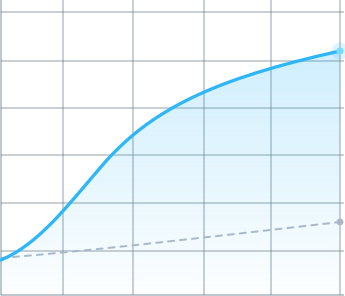
Agentic workflow capacity starts small, grows, and crosses capacity from non-agentic workflowsThe workflow counter and curves illustrate expansion. The blue agentic line starts near zero and overtakes the gray non-agentic line. After ten seconds, both lines remain visible and a modeled potential appears between them: up to approximately 15 percent of addressable work capacity recovered. The curves and workflow count do not calculate that percentage or represent a deployment forecast. The research hypothesis and assumptions are stated below the graph; results may vary.The crossoverWORK CAPACITYMore agentic workflows deployed →

Results may vary.

More workflowsMore work acceptedMore usable capacity

Up to~15%

of addressable work capacity recovered At mature deployment

Work capacity

Agentic workflowsNon-agentic workflows
More agentic workflows deployed

Qualitative illustration of modeled work capacity: the agentic-workflow trend rises above a flatter non-agentic trend and progressively flattens toward mature deployment. No measured customer observations or numerical axis values are plotted.

Both series represent work capacity within the same illustrative scope. Non-agentic capacity grows gradually. Agentic capacity begins near zero, crosses it, and continues growing as more workflows contribute accepted work. The modeled hypothesis is up to approximately 15 percent of addressable work capacity recovered. It is not a return-on-investment calculation, measured customer result, or guarantee.


Turn AI work intoinstitutional capacity.